
When someone marks a cost "billable," they usually intend one of two things: this cost is for a client project, or this cost should be invoiced to the client. The two concepts are related, but they are not the same.
To NetSuite, it means one thing only: this cost is eligible to be put on a customer invoice.
The potential confusion by those entering the costs is a big deal because of the potential for cash leakage and erosion of trust with the client if billing does not follow what is prescribed in the contract. This is particularly sensitive for agency businesses. Every cost a firm incurs on behalf of a client should end in one of two ways, by decision rather than by accident. Either it is recovered, billed directly or covered by a fee per contract terms, or it is intentionally absorbed.
What "billable" means to the business
Every cost a services firm incurs falls into one of three buckets:
- A client cost the client pays for directly. The venue deposit, the airfare the statement of work passes through, the stock photography license bought for the client's deck. The client sees this cost as its own line on an invoice, at cost or with whatever markup the contract allows.
- A client cost recovered through a fee, or absorbed. Travel already built into a fixed-fee engagement. The client dinner you chose not to bill. This is still a client cost, and it still belongs on the project's books, because it affects that project's margin. But the client will never see it as a line item.
- Overhead. The team lunch, the internal conference, the office supplies. It has no client.
The first two are both client-related. Only the first one is billable.
Billable means pass this specific cost through to the client's invoice. It does not mean "this cost relates to a client." The relationship of the cost to client is captured elsewhere.
Upstream: where intent is captured
The Billable flag sits at the point of entry because the person who incurs and records the cost should know best whether it is meant to be invoiced directly. They are familiar with the statement of work (or at least should be!) and they booked the venue or booked the media spot or traveled on behalf of the project.
The point of entry for expenses and procurement depends on the firm. Many use boundary systems: expense platforms like Concur, Expensify and Ramp, and AP and procurement tools like Bill.com, Stampli and Procurify. Others enter expense reports, purchase orders and vendor bills directly in NetSuite, so the NetSuite UI is the point of entry. Regardless of what system is the point of entry, they typically capture three key dimensions:
- Expense Type answers "What did you buy?" It drives the GL account. It does not decide invoicing or identify the client.
- Project (or Customer/Job) answers "Who or what is this cost for: a client, or overhead?" It does not decide invoicing.
- Billable answers "Should the client be invoiced for this specific cost?" It does not mean "client-related."
Getting this right starts with one sentence of definition, written down, and trained on: Check Billable only if this cost will be invoiced to the client as its own line. Otherwise, pick the client or overhead project and leave it unchecked.
Entry: who writes the Billable field in NetSuite
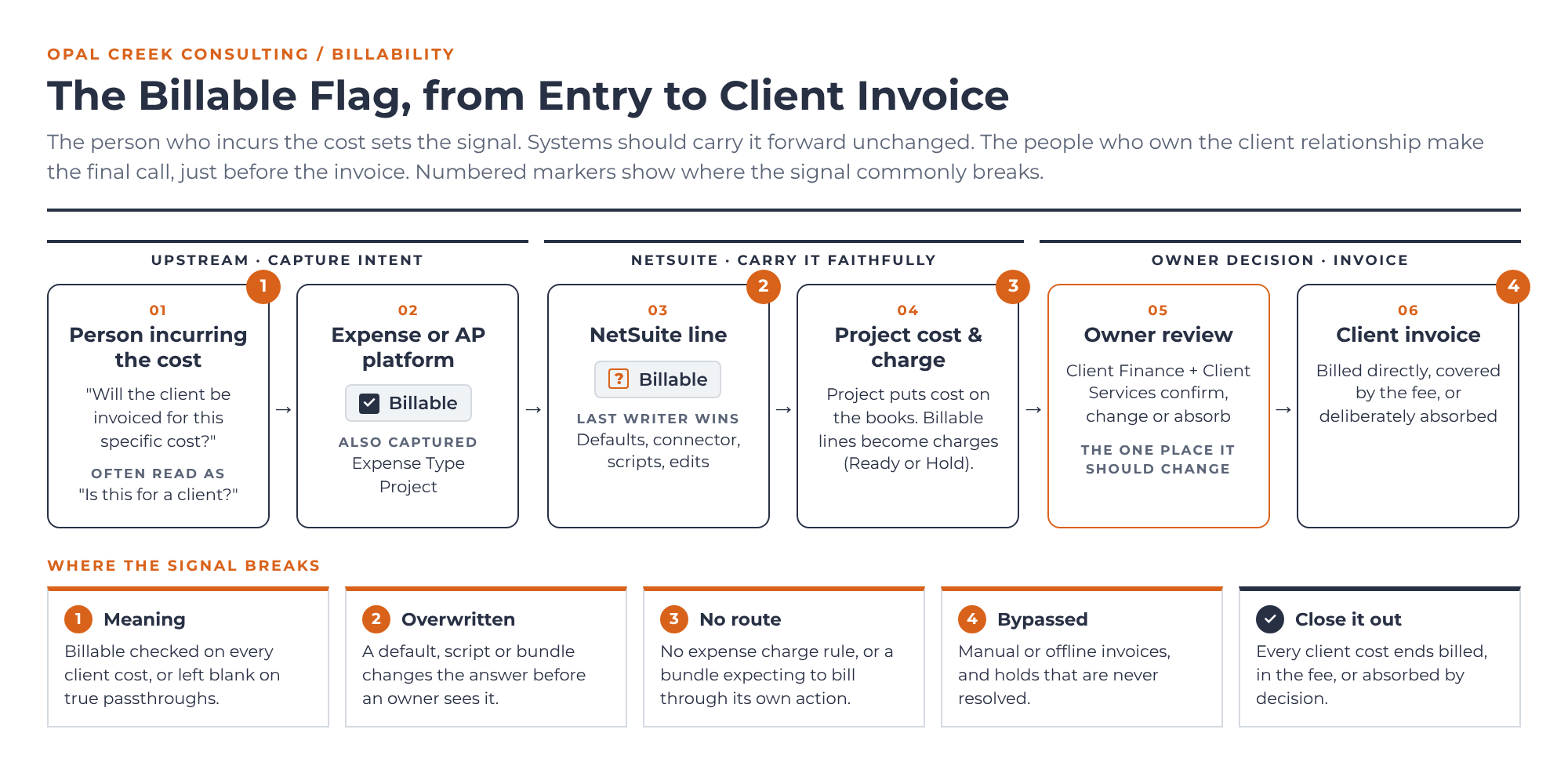
Once the cost lands in NetSuite, the Billable checkbox on the transaction line carries the signal. It looks like a simple yes or no. In practice, at least four mechanisms can write to it, and the last one to write wins.
- Native defaulting. Upon initial creation of an expense report, the line-level Billable field is disabled. Even after selecting an Expense Category, it remains disabled. Only after selecting a Project (with the Expense Category populated) does the field become editable. At that point, if the chosen Expense Category ties back to an Expense Item and the underlying Project utilizes Charge-Based billing, NetSuite automatically defaults Billable = True. The NetSuite defaulting behavior has other variations as well based on preference configuration and Project Billing Type. This is the weakest writer, because any explicit value overrides it.
- The integration. A well-built connector sends Billable explicitly as true or false. In our testing, an explicit false held even on a charge-based project where NetSuite would have defaulted to true. That's what you want: the creator’s intent beats the system's guess.
- Scripts and bundles that run after save. A user event script can load the saved record, change Billable and save it again, overriding everything above it.
- A manual edit in the UI. Anyone with access can change the box. But changing Project or Category re-runs native defaulting, and saving re-runs any after-save script.
Here's a real example of number three. SuiteSuccess – WIP for Cost | AVI is a bundle built by NetSuite's SuiteSuccess team for agencies that want a work-in-progress sub-ledger for project costs. It's unmanaged, has no official documentation, and is only lightly supported. After every qualifying expense report save, it checks whether the line's project has WIP Project checked. If it does, it sets Billable to false and re-saves the report, because the bundle expects to bill those costs through its own release-for-billing action and wants to prevent double billing. That design is reasonable on its own terms. But in an account that bills through native charge-based billing, the cost the employee flagged now has no billing route at all. And the WIP Project box ships checked by default, so every new project is in scope unless someone unchecks it.
The lesson isn't about one bundle. The value on the line is the value written last, not necessarily the value the person chose at point of entry. My advice: Before go-live, list every mechanism that can write to Billable in your account, in the order they run. Then preserve the original answer: map the upstream Billable value to a second, custom line field that only the connector writes to. Comparing the two shows you every line where something downstream changed the signal and this can be used to reconcile, support escalations from the business, and tune the process.
Cost accumulation: on the project's books either way
The Project field puts the cost on the project's books whether or not it's billable. Costs recovered in a fee or absorbed still count against project cost and margin. That's why "client-related" doesn't need the Billable box. The Project field already does that job.
Billable decides one thing at this stage: whether the cost becomes invoiceable. NetSuite gives you two routes from here, and you should pick one deliberately.
Classic Bill Costs to Customers. With this feature on, billable costs appear on the Billable Expenses, Billable Items and Billable Time subtabs when you create an invoice for that customer. Someone ticks them onto the invoice. It's simple and manual, and it works well for low volume.
Charge-based billing. An expense-based charge rule on the project turns billable expense lines into Charge records. Expenses must be marked billable for expense-based rules to generate charges for those expenses. The rule can apply a markup or discount as a multiplier on the cost, so billable doesn't have to mean billed at cost. Each expense generates a charge from only the first rule that applies to it, and the rule's initial stage is either Ready or Hold. If a charge-based project has fixed-fee or time rules but no expense rule, billable expenses won't reach the invoice unless someone creates the charges by hand. (Brian Wenzl covers the mechanics in Charge-Based Billing Projects in NetSuite.)
The decision: where the signal is supposed to change
The Billable flag is a recommendation from the person closest to the cost, not the final word. Just before costs flow onto a customer invoice, Client Finance and Client Services, should work together to review what's queued and may change it. Maybe the relationship calls for absorbing a cost, the project is running over budget, or the contract caps passthroughs. That's their call, and they have every right to make it.
So the principle is simple: the signal should stay faithful from entry until a person who owns the client relationship decides otherwise, at the step just before the invoice. Defaults, connectors and scripts should carry the answer forward, not reinterpret it. When a script changes Billable silently at save, it risks taking that decision out of the hands of the people who own it. If you design a process where a script intervenes like this, you need to make sure everyone who had RACI rights were involved appropriately in the decision.
NetSuite Charges can start on Hold for review, and on the classic route, someone deliberately chooses which billable costs to put on the invoice.
No matter how well you design your upstream processes and how well you faithfully carry the Billable flag from upstream systems and processes into NetSuite, trouble can still rear its head at the invoicing stage. A few examples where things can fall off the rails:
- Invoices built or edited manually, outside the sales order or the billable subtabs
- Offline invoicing from expense-platform reports or a spreadsheet, so NetSuite's charges are never consumed
- Charges held for review and never resolved
In each case, the cost isn't recovered or absorbed by decision. It just stops moving.
What to do about it
- Define the word in one sentence, then train to it. "Billable means this cost will be invoiced to the client as its own line." Put it on the expense form, in the SOP and in onboarding. Show people the three-bucket table.
- Keep three questions in three fields. What was bought (Expense Type), who it's for (Project) and whether the client pays for it directly (Billable). Never let one field stand in for another.
- Preserve the original answer. Write the upstream Billable value to a custom field only the integration touches. It turns "who changed this?" into a saved search.
- Inventory every writer of the flag. Native defaulting, the integration, every user event script and bundle, manual edits, in the order they run. Pay special attention to unmanaged bundles from earlier implementations, and check their defaults.
- Test with data that meets every gate. A test only proves something if it reaches the code you're worried about. Build the matrix by subsidiary, approval state, period and project type.
- Choose one billing route per cost. If a bundle, a charge rule and a person with a spreadsheet can all bill the same expense, it likely will be billed twice, or not at all when everyone assumes someone else billed it.
- Give the final decision an owner, and close it out. Make Client Finance AND Client Services responsible for the review step, together. Then regularly reconcile: every client cost should end up billed, covered by the fee, or deliberately absorbed, with nothing left in between.
The bottom line
"Billable" is one of the most overloaded words in services finance. People will keep using it loosely. Systems won't: in NetSuite it means one narrow thing, this cost is eligible for a customer invoice, and every default, connector and script reads it literally. The person who incurs the cost is best placed to set that signal, and the people who own the client relationship are entitled to change it. Everything in between, the connector, the defaults, the scripts, should carry it forward faithfully.
Write down what the word means, protect the original answer, and know every system that can touch it. Then every cost you incur for a client gets recovered or absorbed because someone decided it should be.
Sources
Oracle NetSuite Help Center
Billing Costs to Customers: the Bill Costs to Customers feature, Billable field defaulting by project billing type, the Billable Expenses/Items/Time invoice subtabs
https://docs.oracle.com/en/cloud/saas/netsuite/ns-online-help/section_N1248576.html
Billing Expenses to Customers: marking expenses billable on purchase transactions; the Expenses Billable by Default preference
https://docs.oracle.com/en/cloud/saas/netsuite/ns-online-help/section_N1250082.html
Creating Charge Rules: expenses must be marked billable for expense-based rules; the Discount / Markup multiplier; first-matching-rule behavior; Ready or Hold initial stage
https://docs.oracle.com/en/cloud/saas/netsuite/ns-online-help/section_4369706980.html
Billing Charge-Based Projects: Ready charges on the project sales order; billable expenses need an expense-based rule
https://docs.oracle.com/en/cloud/saas/netsuite/ns-online-help/section_3752834264.html
Related Opal Creek posts
Charge-Based Billing Projects in NetSuite (Brian Wenzl)
https://opalcreek.io/blog/charge-based-billing-projects-in-netsuite
Time and Materials Projects in NetSuite (Brian Wenzl)
https://opalcreek.io/blog/time-and-materials-projects-in-netsuite
Know Your Rights (Mathias Craig)
https://opalcreek.io/blog/know-your-rights