
From search to peer
Like most people, I started using AI to replace search engines. Ask a question, get an answer.
Then came deep research. I'd give the LLM a topic, let it run, and come back to a polished report with sources and section headings. The first one I tried was on FP&A cubes. It was amazing. It was like a great encyclopedia article, or textbook chapter.
But in the same way that I have a limited appetite for encyclopedia articles and textbook chapters, I found that I wasn’t using deep research that much, and when I did, it was to generate materials that I would skim but not read. I was producing information but not consuming any.
I’m getting much better results now. Instead of asking for a report, I’m using the AI to work through a topic in conversation. I ask one question at a time, each building on the last. I can stop and argue or clarify a point, and the LLM will direct me to authoritative resources on that one point. That's how I learn best. It turns out to be how I get the best work out of AI too: in collaboration.
Ask for one thing at a time
LLMs can produce complete deliverables. For a professional who cares about their craft, that’s more of a problem than a benefit.
Ask for a complete discovery report in one go and you get exactly that: a long, polished document that is confident, well organized, and almost certainly contains important inaccuracies. Every assumption the AI made on your behalf is obscured by its fluent prose. Some of them are right and some are wrong. You don’t know which until you read every line as carefully as if you'd written it yourself.
Editing it is worse. Change the framing in one section and now the following sections are incorrect and in the wrong order. Getting it aligned with what you and the client actually mean can take longer than just writing it yourself would have.
We generate so much information now. For example, at Opal Creek we have an AI notetaker join us for every meeting, even face to face ones. So for a lot of our clients, every discussion we’ve ever had is recorded and we have the transcript. In addition we take our own notes about what’s critical. I love to get in front of the whiteboard with a client and draw a system diagram. We don’t leave the office without a photo of that.
If you feed all of that into the AI, you can produce some dazzling-looking documents. But your source materials are two-dimensional — who said what about what. They don’t have much to say about how people are feeling, whether they’re on board for the change you propose. You can’t read organizational culture from a transcript any more than you can tell how good an employee is going to be by how they describe themselves in the interview. The document may dazzle, but it doesn’t describe reality in all three dimensions.
So I don't ask for the whole thing. I build it together with the AI, in small pieces. That way I catch wrong turns early and steer the process throughout. I make sure each turn is exactly how I want it before taking the next turn.
We talk about it like we’re sailing. It’s fine to leave port a half degree off course if you’re taking your bearings every five minutes. If you wait too long to correct course, you’ll find you’re way out of position.
This all assumes you know where you’re going.
Scaffolding is my job
Before the AI writes a word, I build the scaffolding. That part is mine.
Scaffolding starts with a north star: a sentence or two on what this deliverable has to accomplish for this client. It also means rough mockups of the hard parts. For a financial model, that might be an Excel workbook with the tabs and key rows sketched in. For a process, a rough diagram of who hands what to whom. Nothing polished, just enough that the work leaves port pointed the right way.
A recent example: a deep dive for an advertising agency on how it handles out-of-pocket pass-through expenses. The north star and the first mockups were mine before the AI drafted anything.
The scaffolding is important for the AI, but it’s more important for me. To set a north star, I have to understand the problem. To judge what comes back, push on it, and steer the next round, I have to understand it well enough to know when an answer is wrong or the entire trajectory is off course. That's what being the human in the loop actually requires. If you don't understand what you’re working on and have a clear vision for what you want to build, you should get out of the loop. You’re just in the way.
Our clients don’t pay us to just tell them what the AI Chatbot said. Why would they?
The method
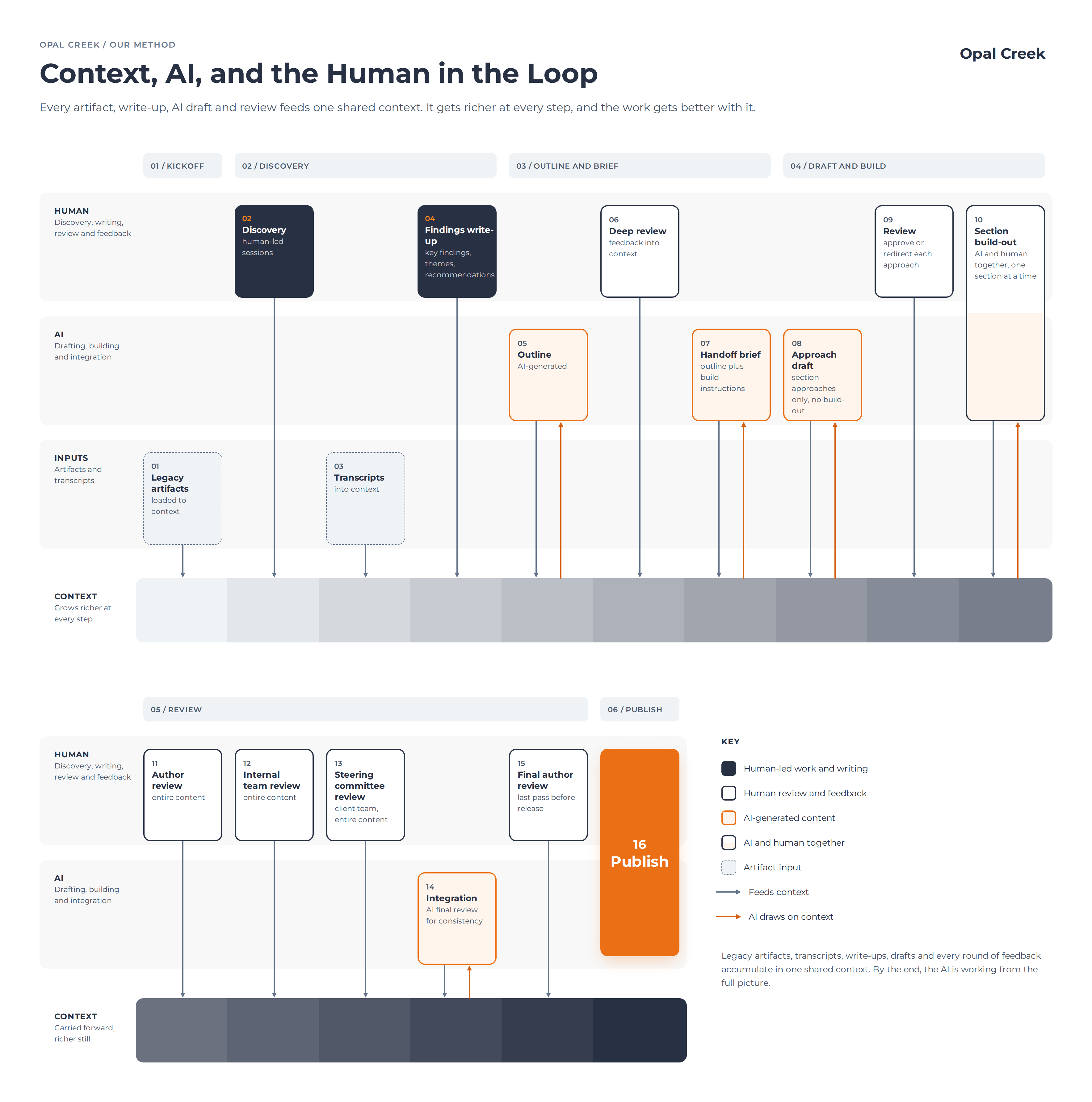
Here's how I build a client deliverable with AI today.
- Build the context. I gather source materials. I perform discovery and capture whiteboard diagrams, my synthesis notes, and transcripts, and I feed it into the project context, iterating and iterating.
- Outline first, then iterate. I start a thread with only the outline in play, and we go back and forth until the structure is right. Changing a heading is cheap. Changing a finished section is not.
- Build the key subsections in their own threads. The hardest parts, such as a financial model, a process map, or a technical deep dive, get their own working sessions so each gets full attention, from me, other human stakeholders, and the AI.
- Write a Working Outline and Handoff Brief. From the outline thread, I have the AI produce a brief for the thread that will build the deliverable. I review and mark it up before anything else happens.
- Approve an approach box for each section. Before drafting a section, the AI writes a short paragraph on what the section will say and how. I approve or redirect it, and only then does it draft.
- Tag reviewer notes to people. Wherever a draft guesses, leans on a source that needs checking, or needs someone's judgment, the AI leaves an inline note naming who should look at it. The first review round goes straight to those notes.
- Do the final edit myself. I review all of it to ensure it aligns with the context, our understanding, our guidance, and our conclusions.
Step 4, the Handoff Brief, is critical. It does two jobs. The obvious one is telling the AI what to write: decisions already made, guardrails, open items, and where each piece of evidence comes from. The less obvious job is telling it how to work with me: draft one section at a time, confirm the approach first, ask rather than guess, and flag what needs review. That second job is what turns the AI from a report generator into a collaborator. Because it's written down, it persists across threads and across weeks.
Here's what goes into a Handoff Brief, with generic sample lines in place of real client details:
| Part | What it contains | Sample line |
|---|---|---|
| How we work | The collaboration process | “Draft section by section. Confirm the approach for each section before writing it.” |
| Decisions made | Settled structure, terminology, scope | “Call the roadmap’s steps ‘Stages,’ never phases, to avoid clashing with project phases.” |
| Drafting guardrails | Tone, what never appears, whose voice to preserve | “Never name other clients used as reference examples.” |
| Open items | Missing inputs and pending decisions | “Prior-year audit report: requested from the controller.” |
| Source map | Which sources feed which sections | “Findings: the lead consultant’s notes are the controlling input.” |
| Outline | The sections, with a marker on any waiting for inputs | “[waiting] 3.6 Audit history” |
Where I still start from scratch
Not everything should go through AI. Some work I still do by hand, on purpose.
The clearest case is the IT ecosystem architecture diagram: every system a client runs, what feeds what, and where people fill the gaps by hand. I draw it myself, box by box and line by line. AI could produce a version faster, but the diagram isn't the deliverable. It’s about giving everyone on the Opal Creek team and, more importantly, the client team, a shared understanding of the landscape we’re working in. The benefit of building it is what everyone learns in building it.
Each line I draw raises a question. Where does this data come from? Who rekeys it? What happens when it breaks? Working through those questions is how I come to understand a business and internalize it. Putting the diagram in front of client stakeholders is how I find out where I'm wrong.
The principle: when making something is how you come to understand it, handing that work off means skipping the understanding. And the understanding is what I'm there to provide.
The toolkit, as of October 2026
Here's what I'm working with today. It will undoubtedly change as the tools themselves grow and evolve.
| Tool | What I use it for | How it's doing |
|---|---|---|
| Claude (chat) | Briefs, outlines, and diagrams | Strong |
| Claude (chat) | Generating PowerPoint decks | Weaker, but improving fast |
| Claude in PowerPoint, Word, and Excel | Working directly inside the documents | Strong |
| Claude connector for Google Sheets | Working with live spreadsheets | Strong |
| VS Code | NetSuite SuiteCloud Development Framework (SDF) projects | Strong |
| LucidChart | Diagramming (my favorite diagramming tool) | Weak on AI |
The specific tools matter less than the method. The tools will keep changing. Building in stages, with a person setting the direction and reviewing every step, is what has held up.
What the client gets
All of this comes back to one thing: doing more for our clients. More breadth, because a discovery can cover ground it couldn't before. More depth, because the time I used to spend gathering inputs now goes into understanding them. More quality, because every claim gets checked and every deliverable gets a targeted review.
Two benefits are easy to miss. Fact-checking happens as we build, not as a scramble at the end. And deliverables stay aligned with each other even while discovery is still moving. When a finding shifts, the report, the workbook, and the recommendations shift with it. Before the help from AI tools, it was so much harder to keep documents from getting stale.
By my estimate, working this way lets me deliver two to five times the value for a client. Sometimes even ten times.
The multiplier comes from the hand AND the tool. AI is a chisel. In the hand of a sculptor, a professional with deep industry knowledge and a real understanding of the client, it can carve what wasn't possible before. The sculptor sets the stage, steers every round, and makes the final cut.
One final thought
We take client data security seriously. All of the above activities are done in paid accounts. Opal Creek does not let our data nor our clients’ data be used for model training, nor do we let our LLMs connect to any of our client accounts.
I created this blog post in partnership with AI, following exactly the methodology above. I was the hand and Claude was the chisel.