We have a client who uses Saved Searches alongside Datasets and Analytics Workbooks to look at Time data. As we’ve discussed elsewhere, both have their place in the NetSuite user’s toolkit. Using both tools to look at the same set of data yielded different results. Two business leaders using different reports – one a Saved Search and the other a Workbook – looked at the same set of projects but calculated different contribution margins. Here’s how that can happen.
The discrepancy revolves around the Rate field on Time. Under certain conditions, when viewed in a Dataset (or looking at the record’s xml), a time entry will have a null rate, while in a Saved Search, the same entry will return a non-null rate.
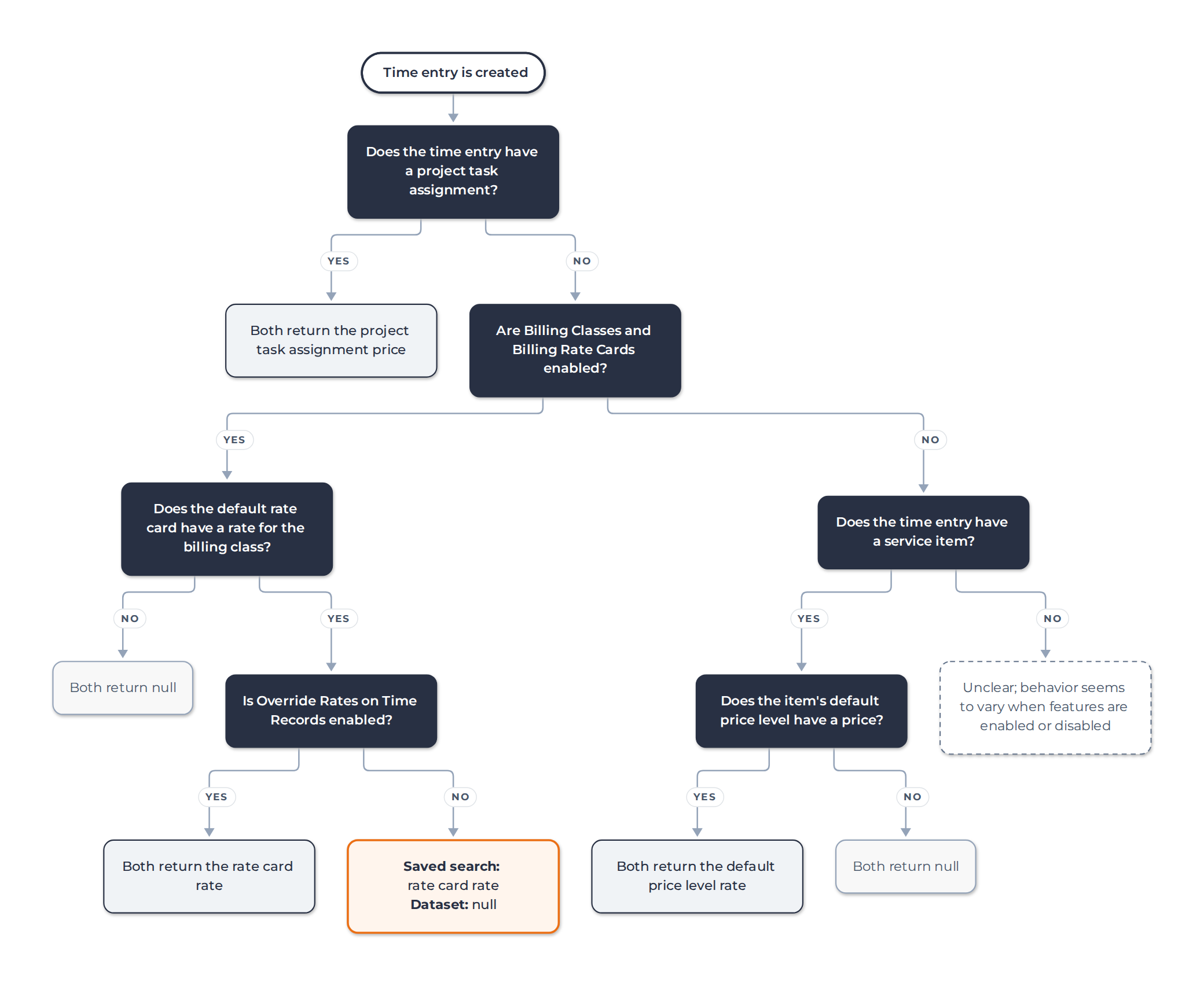
Whether a time entry has a Rate varies based on multiple overlapping factors: is the “Override Rates on Time Records” preference set to true or false (this preference lets users select a price level and directly update the Rate field on time entries)? Was there a Project Task Assignment on the time entry when the time entry was created, or was the task assignment entered after the time entry was created?
Whether or not the time entry itself has a stored rate value, a Saved Search will try to show you one. If you are using billing classes and billing rate cards, it fetches the price from the default rate card associated to the billing class on the time entry. If it can’t find that, it looks for a Service Item and gets a default price from there. A Saved Search only returns a blank rate if it can’t find a best guess to use anywhere.
A Dataset, on the other hand, returns what’s on the record. If there’s a Rate, it will show it. If not, not.
Note that none of this has anything to do with Charges. Time-based Charges use the price as determined by the charge rule, which is not connected to the rate shown on the time entry itself.
Enabling the “Override Rates on Time Records” preference helps. It brings the Rate values between searches and Workbooks closer together. With this preference enabled, the only remaining gap is that time entries created before their related Project Task Assignment still don’t get a rate. In any case, time rates still ignore Charges, so the answer for our client was to:
- Enable “Override Rates on Time Records”
- Create a rule hierarchy
- Charge rate
- Project Task Assignment rate
- Project rate card rate
- Client rate card rate
- Red flag default value (I like using $1 billion; it really gets noticed)
- Write a script that ensures that every time entry has a rate on the record itself using the rule above.
This eliminated ambiguity across reporting tools. The exercise also forced the business leaders to sit down together and agree on how to calculate contribution margin. That conversation probably accomplished more than all our scripting and reporting work.
The NetSuite behavior is all so confusing that we made a flow chart describing it for our own reference. Use it in good health.