
NetSuite Projects work well until your reporting depends on Class and Department. That’s exactly the challenge one of our clients faced. With a complex multi-subsidiary environment and critical custom segments, they are heavy users of intercompany time and expenses. With all their hours and costs on the projects, they wanted to recognize revenue from those projects as well.
In addition to subsidiary, their reporting is also built around Class and Department. The problem is that Projects don’t natively store Class or Department. That means Revenue Arrangements created from Projects have nothing to inherit, leaving revenue recognition journal entries unclassified.
Enter the Project Classification SuiteApp. It only does one thing, but it does it well: it adds Class, Department, and Location fields to the project, and lets you propagate the values from those fields into target transactions.
Installation and Setup
To install the Project Classification SuiteApp, navigate to the SuiteApps marketplace by clicking SuiteApps in the ribbon. Search “project classification,” and validate that you have all the prerequisites:
- Company
- Departments
- Locations
- Classes
- Projects
- Project Management
- SuiteCloud
- Custom Records
- Client SuiteScript
- Server SuiteScript
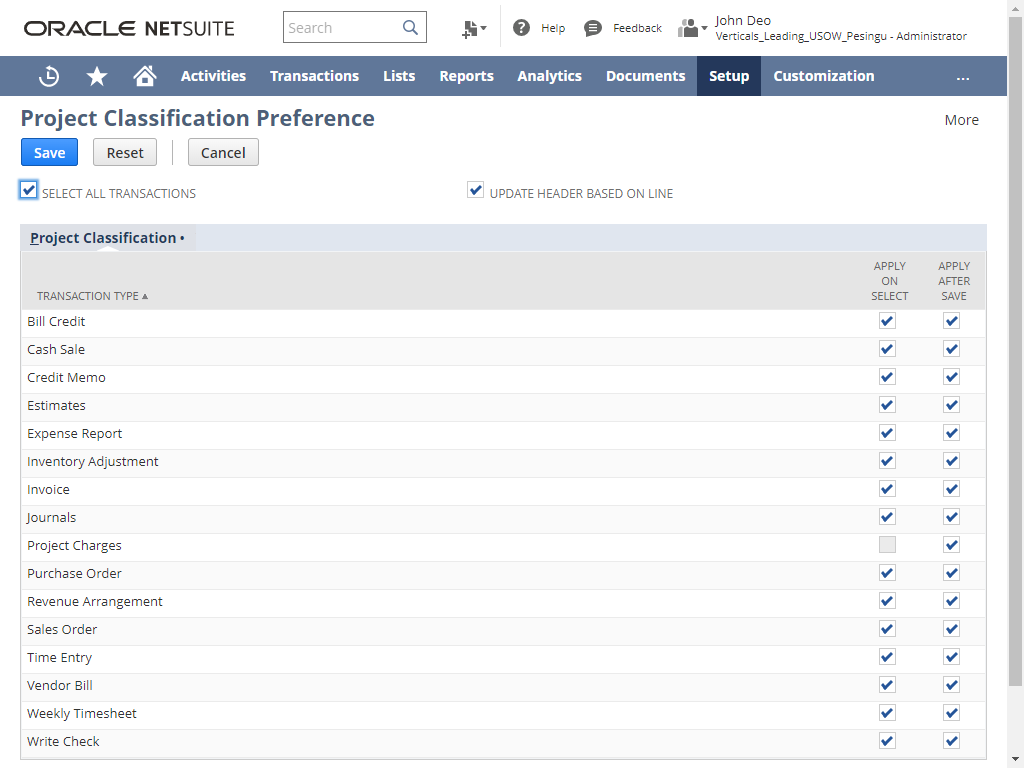
Once installation is complete, there’s one more configuration step: selecting which transaction types should inherit classification values from Projects. Navigate to Setup 🡪 Accounting 🡪 Project Classification. If it’s an option, we recommend choosing both “Apply After Select” and “Apply on Save.” The former will fill in Class/Department/Location on your transactions while you’re still in edit mode, which your users will thank you for. The latter is the only type available for Revenue Arrangements, which is fine because your users don’t generally create those manually.
You’re ready to go!
Putting the App to Work
The Project Classification SuiteApp leverages Class, Department, and Location fields and adds them to the Project record. You must fill these fields in on your projects for the app to do its thing.
Once that’s complete, your transactions will inherit project classification values, and you can report more completely and accurately on your project and organization performance. That’s it!
What about my existing custom fields?
Many of our clients already use this app, but some – especially those who have been on NetSuite for a long time – have their own custom Class, Department and (occasionally) Location fields on Project. In a recent case we worked on, the client had several thousand active Projects that already had Class and Department in other custom fields on the Project.
They also had years of reports and searches leveraging their custom fields on Project. Rebuilding hundreds of saved searches (public and private) and dozens of reports was a nonstarter.
For this client, we:
- Used a Mass Update to populate the Project Classification fields from the legacy custom fields.
- Hid the new Project Classification fields from Project forms that our users interact with (note that because of the SuiteApp’s design we were only able to hide these fields from “view” mode, not edit, because the app adds the segment fields to the form as natural fields but also as scripted fields, and the scripts in the app are locked).
- Created a simple workflow that reads the legacy custom fields and writes any set/edit updates to the SuiteApp’s corresponding fields.
With this simple addition, user behavior doesn’t have to change, project setup doesn’t have to change, a million searches don’t have to change… and the user still gets the value of the app!
Final Thought
The Project Classification SuiteApp is free, takes less than an hour to install and configure, and adds utility to NetSuite without adding user friction. If you’re using Projects – and in particular if you are using Project Revenue Rules – it’s pretty close to a no-brainer.